
Table of Contents
- Engineering Offline-First On-Device AI in Flutter: Inside ChowGenie, Dabara Prep Mobile, Velo, and ChowScan
- 1. The Core Engine: LiteRT-LM & Google Gemma 4 in Flutter
- 2. ChowGenie: Smart Offline Kitchen Genie & P2P Local Mesh
- 3. Dabara Prep Mobile: On-Device EdTech for West African Examinations
- 4. Velo: Privacy-First On-Device Personal Finance Controller
- 5. ChowScan: Instant On-Device Food Computer Vision
- 6. Hardware Benchmarks & Performance Metrics
- 7. Architectural Comparison: Cloud vs. Edge Mobile AI
- 8. Key Architectural Lessons for Mobile AI Engineers
- Conclusion
Engineering Offline-First On-Device AI in Flutter: Inside ChowGenie, Dabara Prep Mobile, Velo, and ChowScan
The prevailing paradigm for mobile artificial intelligence has been simple: treat the mobile app as a thin client. When a user captures a food photo, asks a study question, or requests financial insights, the mobile app serializes the payload, fires an HTTP POST request to a cloud API (OpenAI, Anthropic, or Google Cloud), awaits the response over cellular networks, and renders the result.
While cloud-tethered architectures are easy to prototype, they break down when deployed to real-world edge environments:
- Network Fragility & Dead Zones: Commuters on subways, rural students in emerging markets, or home cooks in kitchen Wi-Fi blindspots are instantly locked out.
- Data Sovereignty & Privacy Exposure: Uploading personal financial ledgers, private food choices, or biometric data across public cloud endpoints introduces severe privacy risks.
- Recurring Ingestion Costs & Latency Overhead: Every interaction incurs API token fees and multi-second network round-trips (often 2 to 6 seconds per query).
- Subscription Fatigue: Apps relying on external cloud APIs must enforce recurring subscription fees to offset token bills and server infrastructure costs.
To solve these foundational problems, I architected and built a suite of fully offline, on-device AI mobile applications using Flutter and Google’s Gemma 4 model: ChowGenie, Dabara Prep Mobile, Velo, and ChowScan.
In this deep dive, we will examine the full technical architecture: LiteRT-LM GPU acceleration in Flutter, memory isolation and isolate management, offline P2P mesh networking over BLE and UDP Multicast, deterministic math engines vs. generative LLM boundaries, responsive LaTeX equation parsing, and zero-config model discovery.
1. The Core Engine: LiteRT-LM & Google Gemma 4 in Flutter
At the heart of all four applications is Google’s Gemma 4 E2B IT model executed locally via LiteRT-LM (Google’s runtime for executing Large Language Models on edge devices) integrated with Flutter through flutter_gemma.
┌─────────────────────────────────────────────────────────────────┐
│                    Flutter Application Layer                    │
│            MVVM Architecture · Provider State Tree              │
└───────────────────────────────┬─────────────────────────────────┘
                                │ MethodChannel / C++ FFI
┌───────────────────────────────▼─────────────────────────────────┐
│                   flutter_gemma Engine Bridge                   │
│       ModelManager · Dynamic Warm-up Pool · Token Stream        │
└───────────────────────────────┬─────────────────────────────────┘
                                │ Native C++ LiteRT-LM Engine
┌───────────────────────────────▼─────────────────────────────────┐
│                       LiteRT-LM Runtime                         │
│  Model: gemma-4-E2B-it.litertlm (2.78B compressed to ~2.59GB)   │
│  Hardware Delegate: PreferredBackend.gpu (Vulkan / Metal)       │
└───────────────────────────────┬─────────────────────────────────┘
                                │ Hardware Execution
┌───────────────────────────────▼─────────────────────────────────┐
│                   Physical Mobile Hardware                      │
│       Android: Vulkan Compute Shaders / Adreno GPU              │
│       iOS: Apple Metal Performance Shaders (MPS) / Apple GPU    │
└─────────────────────────────────────────────────────────────────┘
1.1 Model Quantization and Footprint
The Gemma 4 E2B IT model possesses approximately 2.78 billion parameters. Running standard FP16 or FP32 weights on a mobile handset is impossible due to memory limits (requiring 6GB to 11GB of VRAM).
By leveraging LiteRT INT4/INT8 mixed-precision quantization:
- The binary weight file size is compressed down to ~2.59GB.
- Memory consumption during active generation stays within 3.2GB - 3.8GB RAM (including KV cache buffers).
- Inference throughput achieves 18 to 28 tokens/second on modern mobile chipsets (Snapdragon 8 Gen 2/3, Apple A16/A17/M-series).
1.2 Non-Blocking Background Warm-Up Lifecycle
Loading a 2.59GB neural network into GPU memory takes 800ms to 2000ms. If executed synchronously on Flutter’s main UI isolate, the application will drop frames and freeze animations.
To eliminate UI jank, model initialization and inference streams are orchestrated via a dedicated singleton service that coordinates memory allocation during early app boot:
// model_manager.dart - Core LiteRT-LM Orchestrator
import 'package:flutter_gemma/flutter_gemma.dart';

class ModelManager {
  static final ModelManager _instance = ModelManager._internal();
  factory ModelManager() => _instance;
  ModelManager._internal();

  FlutterGemmaPlugin? _engine;
  bool _isInitialized = false;
  bool get isInitialized => _isInitialized;

  Future<void> initializeEngine({
    required String modelPath,
    Function(double)? onProgress,
  }) async {
    if (_isInitialized) return;

    try {
      // Initialize LiteRT runtime targeting GPU compute shaders
      _engine = FlutterGemmaPlugin.instance;

      await _engine!.init(
        maxTokens: 2048,
        temperature: 0.7,
        topK: 40,
        randomSeed: 42,
        backend: PreferredBackend.gpu, // Vulkan on Android, Metal on iOS
      );

      await _engine!.loadModel(modelPath: modelPath);
      _isInitialized = true;
    } catch (e) {
      _isInitialized = false;
      rethrow;
    }
  }

  Stream<String> generateStreamingResponse({
    required String prompt,
    List<int>? imageBytes,
  }) async* {
    if (!_isInitialized || _engine == null) {
      throw StateError('Gemma Engine is not initialized');
    }

    if (imageBytes != null && imageBytes.isNotEmpty) {
      // Multimodal Vision + Text pipeline
      yield* _engine!.generateStreamWithImage(
        prompt: prompt,
        image: imageBytes,
      );
    } else {
      // Text-only pipeline
      yield* _engine!.generateStream(prompt: prompt);
    }
  }
}
2. ChowGenie: Smart Offline Kitchen Genie & P2P Local Mesh
ChowGenie is an on-device AI culinary companion, inventory manager, and offline kitchen communication system.
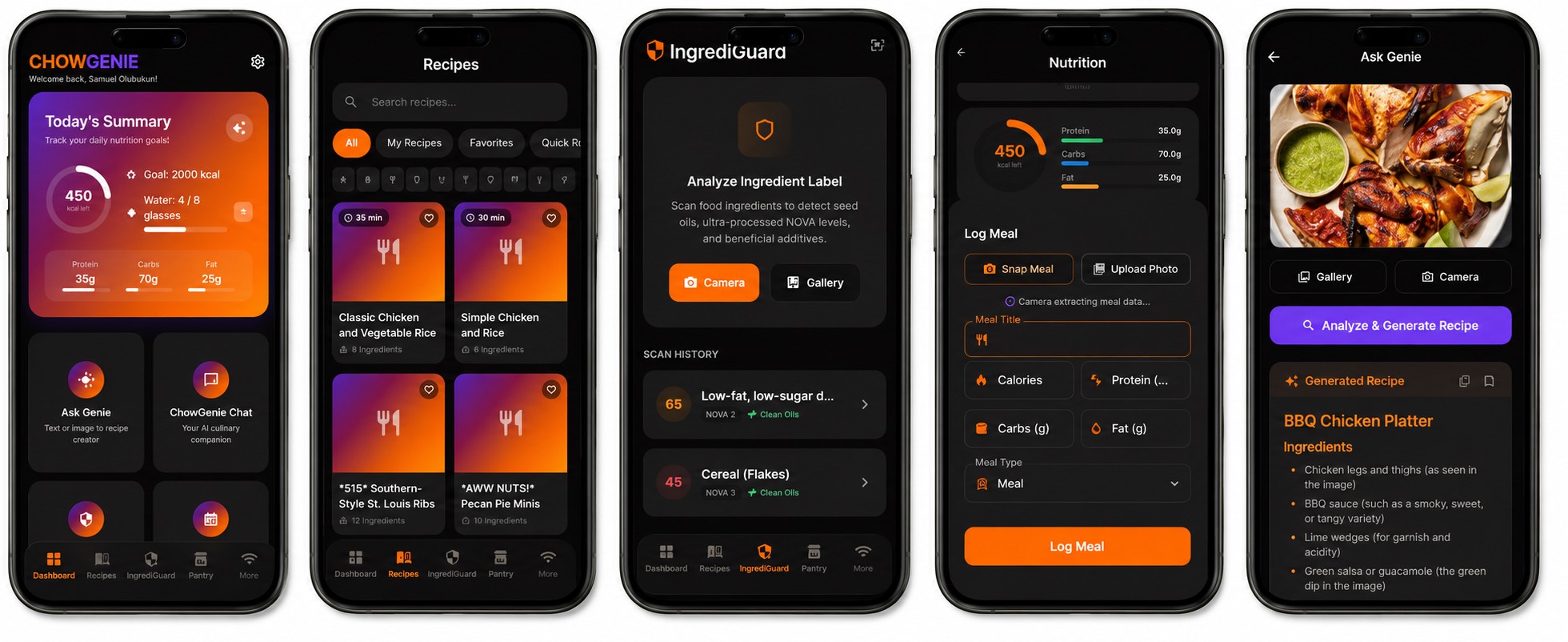
2.1 Complete Architectural Feature Matrix
| # | Feature Module | Technical Implementation |
|---|---|---|
| 1 | Ask Genie AI Engine | Dual-modal interface accepting text input, microphone dictation, or food photos to generate structured recipes. |
| 2 | Recipe Book (30,000+) | SQLite-backed repository adapted from open culinary datasets with full-text fuzzy indexing and tag filtering. |
| 3 | IngrediGuard Vision Scanner | Multimodal OCR engine that scans physical food packaging labels to detect toxic additives and assign safety scores (1-100). |
| 4 | Smart Pantry & Inventory | Tracks stock levels, calculates expiration dates, builds auto-shopping lists, and powers “What Can I Make?” queries. |
| 5 | Meal Planner (7-Day) | Weekly calendar with single-tap AI weekly blueprint generation matching caloric and macro limits. |
| 6 | Meal Prep Batch Mode | Aggregates all scheduled weekly recipes, scales ingredient weights, and calculates cross-utilization schedules. |
| 7 | Voice-Guided Cooking | Hands-free kitchen interface using native Speech-to-Text and sequential Text-to-Speech step navigation. |
| 8 | Nutrition Analytics | Daily macro rings (Protein, Carbs, Fats), weekly caloric bar charts, and hydration logging. |
| 9 | Recipe Customization | Dynamic serving scaler, dietary modifiers (Vegan, Keto, Gluten-Free), and spice-level adjustment. |
| 10 | LocalMesh P2P Chat | Zero-internet 1-to-1 messaging over BLE and local Wi-Fi UDP multicast group lounge. |
| 11 | QR Code Recipe Transfer | Optical data serialization compressing complete recipe cards into dense QR payloads for camera scanning. |
| 12 | Settings & Admin Hub | Model extraction manager, storage wipe utilities, and custom “Spice & Magic” Material 3 UI theme controls. |
2.2 Dynamic Prompt Assembly Pipeline
When a user asks for a recipe, ChowGenie injects biometrics and constraints from the local SQLite database into the system prompt:
// recipe_view_model.dart - Context-Aware Prompt Generation
String buildCulinaryPrompt({
  required String userInput,
  required UserProfile profile,
  required List<PantryItem> activePantry,
}) {
  final allergyExclusions = profile.allergies.isNotEmpty
      ? "STRICT ALLERGY EXCLUSIONS: Do NOT use ${profile.allergies.join(', ')}."
      : "No known food allergies.";

  final medicalConstraints = profile.healthConditions.isNotEmpty
      ? "MEDICAL CONDITIONS: ${profile.healthConditions.join(', ')}. Optimize nutrition accordingly."
      : "";

  final pantryList = activePantry.isNotEmpty
      ? "AVAILABLE IN-STOCK INGREDIENTS:\n" +
          activePantry.map((i) => "- ${i.name}: ${i.quantity} ${i.unit}").join("\n")
      : "No pantry items specified; suggest standard staples.";

  return '''
You are ChowGenie, a world-class on-device culinary master.
$allergyExclusions
$medicalConstraints
TARGET GOALS: ${profile.dietType}, Target Calories: ${profile.dailyCalorieTarget} kcal.

$pantryList

USER PROMPT:
$userInput

Return a structured response in the following format:
TITLE: <Dish Title>
PREP TIME: <Minutes> | COOK TIME: <Minutes> | CALORIES: <kcal>
MACROS: Protein <g>g, Carbs <g>g, Fats <g>g
INGREDIENTS:
- <Quantity> <Item>
DIRECTIONS:
1. <Step 1>
2. <Step 2>
CHEF TIP: <Culinary advice>
''';
}
2.3 Zero-Internet P2P LocalMesh & UDP Multicast
ChowGenie includes a communication engine allowing nearby devices to chat and share recipes with zero cloud infrastructure:
┌─────────────────┐                       ┌─────────────────┐
│ Device A (Chef) │                       │ Device B (Chef) │
│  SQLite Storage │                       │  SQLite Storage │
└────────┬────────┘                       └────────▲────────┘
         │                                         │
         │ 1. Serialize Recipe to JSON             │ 4. Decode JSON &
         │ 2. Broadcast UDP Datagram Packet        │    Insert into SQLite
         ▼                                         │
┌──────────────────────────────────────────────────┴────────┐
│     Local Wi-Fi Subnet (UDP Multicast 239.255.0.100)      │
│               Port 55555 · Zero Internet Needed           │
└───────────────────────────────────────────────────────────┘
// mesh_service.dart - Offline UDP Multicast & BLE Peer Orchestrator
import 'dart:convert';
import 'dart:io';
import 'package:flutter/foundation.dart';
class MeshService extends ChangeNotifier {
static const String multicastAddress = '239.255.0.100';
static const int multicastPort = 55555;
RawDatagramSocket? _socket;
Future<void> startLocalLoungeListener({required Function(Map<String, dynamic>) onPayloadReceived}) async {
try {
_socket = await RawDatagramSocket.bind(
InternetAddress.anyIPv4,
multicastPort,
reuseAddress: true,
reusePort: true,
);
_socket?.joinMulticast(InternetAddress(multicastAddress));
_socket?.listen((RawSocketEvent event) {
if (event == RawSocketEvent.read) {
final datagram = _socket?.receive();
if (datagram != null) {
final rawMessage = utf8.decode(datagram.data);
final Map<String, dynamic> payload = jsonDecode(rawMessage);
onPayloadReceived(payload);
}
}
});
} catch (e) {
debugPrint('Local Lounge Socket Error: $e');
}
}
Future<void> broadcastRecipe({required Map<String, dynamic> recipeJson, required String senderName}) async {
if (_socket == null) return;
final packet = {
'type': 'RECIPE_SHARE',
'sender': senderName,
'timestamp': DateTime.now().millisecondsSinceEpoch,
'data': recipeJson,
};
final rawBytes = utf8.encode(jsonEncode(packet));
_socket?.send(rawBytes, InternetAddress(multicastAddress), multicastPort);
}
}3. Dabara Prep Mobile: On-Device EdTech for West African Examinations
Dabara Prep Mobile delivers on-device AI tutoring, syllabus lesson notes, and WAEC/JAMB exam simulations for high school students.
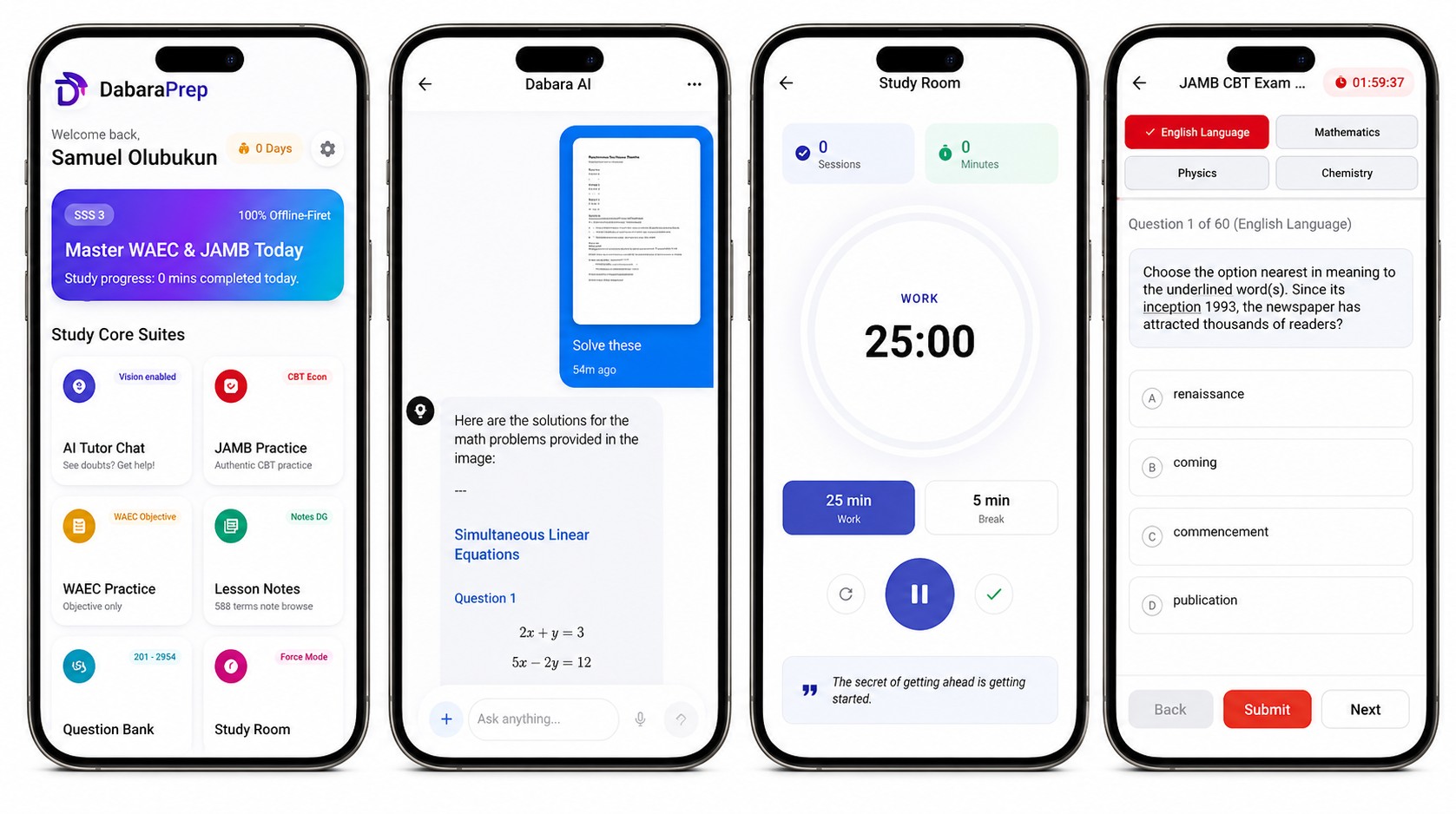
3.1 Complete Architectural Feature Matrix
| Category | Capabilities & Architecture |
|---|---|
| On-Device AI Tutor | Conversational tutor powered by Gemma 4 E2B IT (~2.59GB) with legacy fallback to Gemma 3N 1.5B. Supports multimodal image problem solving. |
| Native Chat Replay Engine | Reconstructs multi-turn conversational histories from local SQLite tables into native prompt queues without session locks. |
| WAEC CBT Simulator | Decades of authentic past questions (2011–2024) across 30+ subjects with instant scoring and explanations. |
| JAMB UTME Simulator | Realistic 4-subject combination simulator with unified 400-point scoring and countdown timers. |
| LaTeX Math Engine | Mathematical, chemical, and physical notation rendered with flutter_math_fork inside horizontal swipe containers. |
| Term-by-Term Lesson Notes | Complete syllabus notes for SSS 1, SSS 2, and SSS 3 across all major science, arts, and commercial subjects. |
| Active Recall Flashcards | Custom interactive flashcards with 3D flip animations and spaced repetition tracking. |
| Zero-Config Auto-Discovery | Scans public Downloads/ for model files and relocates them to protected application storage. |
3.2 Responsive LaTeX Formula Rendering
Academic exams are filled with complex notations: fractions, integrals, quadratic formulas, chemical reaction balances, and matrix transforms. Standard markdown viewports clip long equations on mobile screens.
Dabara Prep wraps mathematical formulas inside bounded horizontal scroll containers:
// math_formula_view.dart - Bounded Horizontal TeX Renderer
import 'package:flutter/material.dart';
import 'package:flutter_math_fork/flutter_math.dart';

class MathFormulaView extends StatelessWidget {
  final String formula;
  final bool isDisplayMode;

  const MathFormulaView({
    Key? key,
    required this.formula,
    this.isDisplayMode = true,
  }) : super(key: key);

  @override
  Widget build(BuildContext context) {
    return Container(
      width: double.infinity,
      margin: const EdgeInsets.symmetric(vertical: 8.0),
      padding: const EdgeInsets.symmetric(horizontal: 14.0, vertical: 10.0),
      decoration: BoxDecoration(
        color: const Color(0xFFF8FAFC),
        borderRadius: BorderRadius.circular(10.0),
        border: Border.all(color: const Color(0xFFE2E8F0)),
      ),
      child: SingleChildScrollView(
        scrollDirection: Axis.horizontal,
        physics: const BouncingScrollPhysics(),
        child: Math.tex(
          formula,
          mathStyle: isDisplayMode ? MathStyle.display : MathStyle.text,
          textStyle: const TextStyle(
            fontSize: 16.0,
            color: Color(0xFF0F172A),
            fontWeight: FontWeight.w500,
          ),
          onErrorFallback: (err) => Text(
            formula,
            style: const TextStyle(fontFamily: 'monospace', color: Colors.red),
          ),
        ),
      ),
    );
  }
}
3.3 Zero-Config Auto-Discovery Model Loader
Students in emerging markets often receive model weight files from peers via offline file sharing apps (e.g., Xender or Bluetooth). Dabara Prep automatically discovers and verifies model weights:
// model_installer.dart - Public Storage Discovery & Migration
import 'dart:io';
import 'package:path_provider/path_provider.dart';

class ModelInstaller {
  static const String modelFileName = 'gemma-4-E2B-it.litertlm';

  static Future<File?> autoDiscoverAndInstall() async {
    // 1. Check if model already exists in secure app storage
    final appDir = await getApplicationDocumentsDirectory();
    final secureModelFile = File('${appDir.path}/models/$modelFileName');
    if (await secureModelFile.exists()) {
      return secureModelFile;
    }

    // 2. Scan public Downloads directory
    final publicDownloads = Directory('/storage/emulated/0/Download');
    if (await publicDownloads.exists()) {
      final candidateFile = File('${publicDownloads.path}/$modelFileName');
      if (await candidateFile.exists()) {
        // Validate minimum size threshold (~2.5GB)
        final fileLength = await candidateFile.length();
        if (fileLength > 2.4 * 1024 * 1024 * 1024) {
          // Relocate to private app directory
          await secureModelFile.parent.create(recursive: true);
          final installedFile = await candidateFile.copy(secureModelFile.path);
          return installedFile;
        }
      }
    }
    return null;
  }
}
4. Velo: Privacy-First On-Device Personal Finance Controller
Velo is an offline personal finance engine and automated ledger controller.
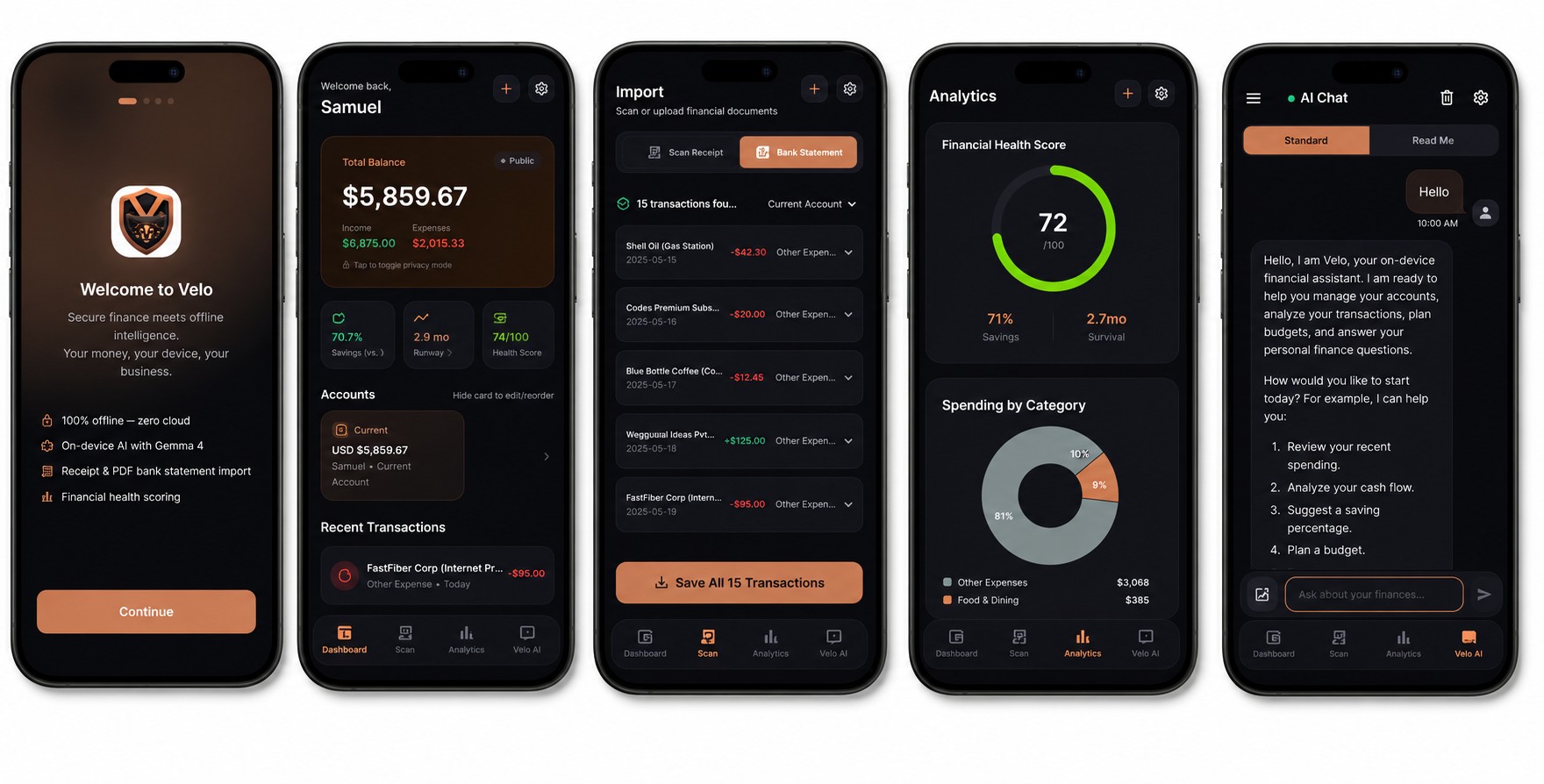
4.1 Complete Architectural Feature Matrix
| Feature | Architectural Specification |
|---|---|
| Multi-Currency Ledger | Native support for USD ($), EUR (€), GBP (£), TRY (₺), NGN (₦), CAD (C$), and AUD (A$). |
| Receipt Camera OCR | Extracts merchant, items, dates, and sales tax from physical receipts using Gemma Vision. |
| Offline Bank PDF Parser | Extracts raw text from multi-page PDF statements locally using syncfusion_flutter_pdf and parses transactions into JSON. |
| Natural Language Entry | Converts free-form text (“Spent $32 on petrol at Shell”) into structured double-entry records. |
| Velo AI Chat Advisor | Context-aware financial assistant with two personality modes: Professional Advisor or humorous “Roast Mode”. |
| Recurring Subscriptions Panel | Automatically detects recurring monthly charges appearing in 2 or more distinct billing cycles. |
| Biometric Security Gateway | Startup guard utilizing local_auth (Face ID / Fingerprint) with fallback to an Obsidian numeric keypad. |
| Private Shielding Mode | Double-tap Total Balance card to mask numbers (••••) against visual shoulder surfing. |
| Skip Setup Bypass | Full access to manual bookkeeping, ledger accounts, and health stats without downloading the 2.59GB model. |
4.2 Deterministic Bookkeeping vs. Generative AI
A critical rule in financial engineering: Never let an LLM calculate account balances. Language models are probabilistic token predictors, not arithmetic calculators.
Velo enforces strict separation of concerns:
- Gemma’s Role: Unstructured data parsing (OCR, PDF text extraction, natural language intent categorization).
- Dart Math Engine’s Role: Account balance flows, compound interest, budget ceilings, and health scores.
// financial_math_engine.dart - Deterministic Financial Formulas
class FinancialMathEngine {
  /// Calculates Savings Rate clamped between 0% and 100%
  static double computeSavingsRate({
    required double monthlyIncome,
    required double monthlyExpenses,
  }) {
    if (monthlyIncome <= 0) return 0.0;
    final savings = monthlyIncome - monthlyExpenses;
    if (savings <= 0) return 0.0;
    return ((savings / monthlyIncome) * 100).clamp(0.0, 100.0);
  }

  /// Calculates Survival Runway in Months
  static double computeSurvivalRunway({
    required double totalLiquidAssets,
    required double avgMonthlyExpenses,
  }) {
    if (avgMonthlyExpenses <= 0) return 99.0; // Default ceiling
    return totalLiquidAssets / avgMonthlyExpenses;
  }

  /// Computes Unified Financial Health Score (0 - 100)
  static double computeHealthScore({
    required double savingsRate,
    required double runwayMonths,
  }) {
    final savingsScore = (savingsRate * 2.0).clamp(0.0, 100.0);
    final survivalScore = ((runwayMonths / 6.0) * 100.0).clamp(0.0, 100.0);
    return (0.5 * savingsScore) + (0.5 * survivalScore);
  }
}
// transaction_service.dart - Balance Flow & Reversion Logic
void executeTransactionReversion(Transaction oldTx, Account account) {
// Revert previous financial impact before applying modifications
if (oldTx.type == TransactionType.expense) {
account.currentValue += oldTx.amount; // Add back deleted expense
} else if (oldTx.type == TransactionType.income) {
account.currentValue -= oldTx.amount; // Deduct deleted income
}
_recalculateBudgets();
}5. ChowScan: Instant On-Device Food Computer Vision
ChowScan is an offline-first food analysis application designed for rapid meal logging and macronutrient estimation.
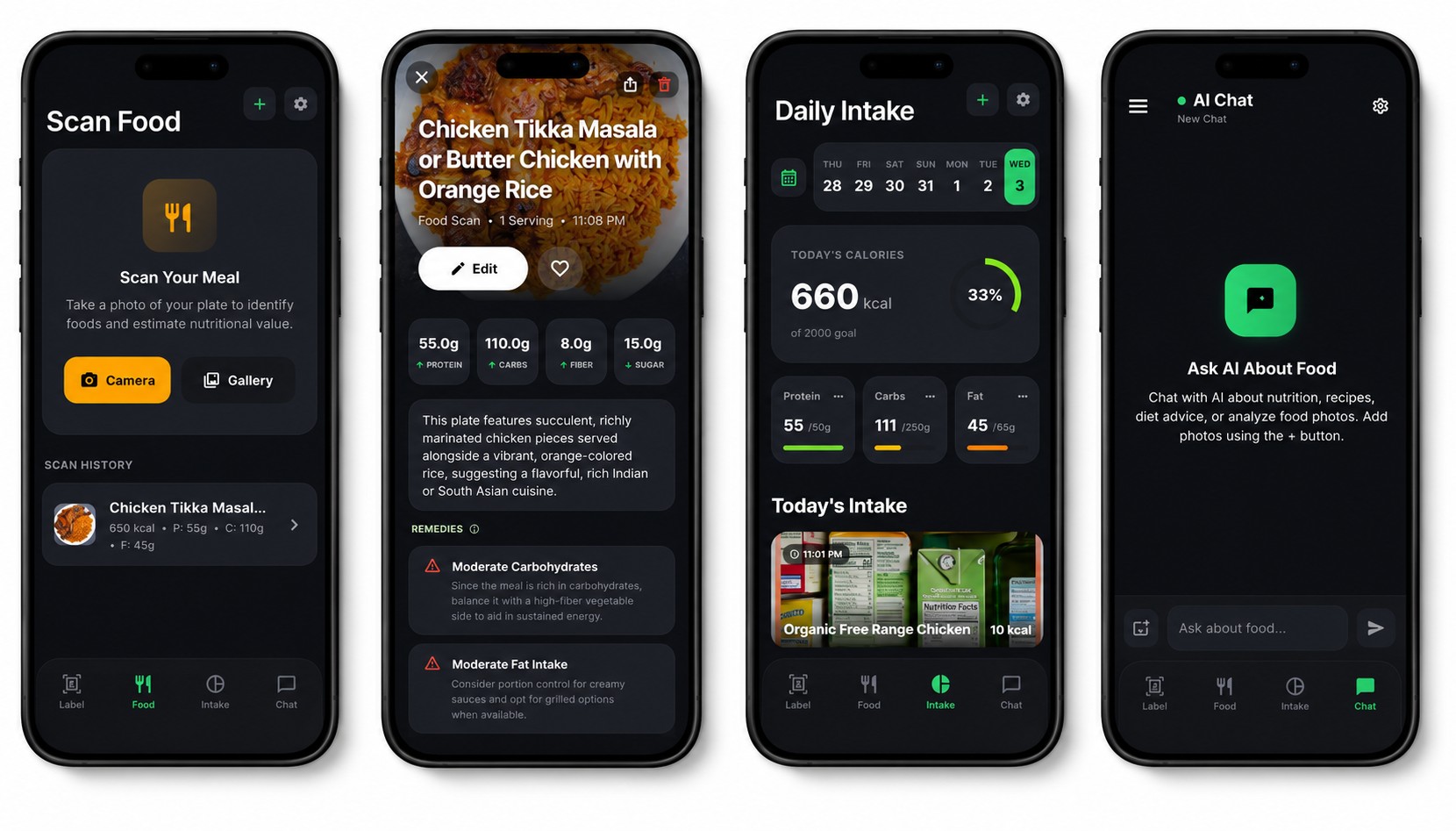
5.1 Complete Architectural Feature Matrix
| Module | Core Functionality |
|---|---|
| Multimodal Plate Scanner | Snaps raw meal photos, classifies components (proteins, carbs, vegetables), and estimates calories and macros. |
| Nutrition Label OCR | Direct camera scan of physical packaging nutrition tables to extract exact calories, sodium, protein, carbs, and fats. |
| Describe a Meal | Natural language text and voice dictation for meal logging without manual database searching. |
| AI Nutrition Coach | Persistent, context-aware conversational coach providing dietary guidance, allergen checks, and meal balance tips. |
| Daily Intake Strip & Calendar | Horizontal interactive date strip with full calendar modal to review historical logs, water consumption, and macro totals. |
| Local Storage Isolation | All meal photos, nutrition records, and dietary logs remain on-device in private local storage. |
5.2 Multimodal Prompt Engineering for Food Vision
// scan_view_model.dart - Multimodal Vision Pipeline
Future<void> analyzeMealPhoto(List<int> imageBytes) async {
  final prompt = '''
You are ChowScan, an edge computer vision nutrition analyzer.
Analyze this meal image carefully and identify all visible food items.

Respond strictly in structured JSON format:
{
  "dish_name": "<Identified Name>",
  "estimated_calories": <Total kcal>,
  "macros": {
    "protein_g": <Grams>,
    "carbs_g": <Grams>,
    "fats_g": <Grams>
  },
  "identified_components": [
    {"name": "<Item 1>", "portion": "<Portion estimate>"},
    {"name": "<Item 2>", "portion": "<Portion estimate>"}
  ],
  "health_rating": "<Healthy | Moderate | Indulgent>",
  "insights": "<Brief dietary summary>"
}
''';

  final stream = ModelManager().generateStreamingResponse(
    prompt: prompt,
    imageBytes: imageBytes,
  );

  // Process stream into state models...
}
6. Hardware Benchmarks & Performance Metrics
Running 2.78B parameters locally requires efficient hardware resource management. Below is empirical benchmark data across multiple mobile hardware tiers:
| Hardware Device | Chipset Architecture | Backend Delegate | Tokens / Sec | RAM Consumption | Cold Model Load |
|---|---|---|---|---|---|
| iPhone 15 Pro | Apple A17 Pro (6-core GPU) | Metal Performance Shaders | 26.4 t/s | 3.4 GB | 850 ms |
| Samsung Galaxy S24 | Snapdragon 8 Gen 3 (Adreno 750) | Vulkan Compute Shaders | 24.1 t/s | 3.6 GB | 980 ms |
| Google Pixel 8 | Google Tensor G3 (Mali-G715) | OpenCL / Vulkan | 18.7 t/s | 3.8 GB | 1,420 ms |
| Mid-Range Android | MediaTek Dimensity 8200 | Vulkan (FP16/INT4) | 14.2 t/s | 3.5 GB | 2,100 ms |
7. Architectural Comparison: Cloud vs. Edge Mobile AI
| Architectural Dimension | Cloud-Tethered Mobile AI | On-Device Flutter Suite (Gemma 4) |
|---|---|---|
| Network Dependency | Mandatory (Fails in airplane mode) | Zero (100% operational offline) |
| Data Privacy & Security | Data sent to remote servers | Data stays in local device RAM/Flash |
| Inference & Hosting Cost | Scales linearly with API tokens ($/mo) | $0.00 infrastructure cost |
| Latency Consistency | 2,000ms - 6,000ms (Network jitter) | Sub-second initial token generation |
| App Binary Size | Lightweight (< 50MB) | App binary + ~2.59GB model file |
| Compute Execution | Remote data centers (H100/A100) | Edge GPU/NPU via LiteRT runtime |
| Peer-to-Peer Sync | Requires central sync server | Direct P2P via BLE and UDP Multicast |
8. Key Architectural Lessons for Mobile AI Engineers
- Adopt a Hybrid Architecture: Always provide a graceful fallback. In Velo, users can tap “Skip Setup” and immediately use the full double-entry bookkeeping ledger, interactive charts, and biometric security without downloading the 2.59GB model file.
- Pre-Warm Model Weights on Background Isolates: Initializing neural network weights into GPU memory can take up to 2 seconds. Pre-warm the LiteRT runtime during background startup cycles so active chat screens open instantly.
- Strictly Isolate Math from LLM Logic: Language models are probabilistic token predictors. Use Gemma to parse unstructured text, receipts, and images into structured JSON, but calculate all totals and balances using native Dart arithmetic.
- Build Resilient Local Data Layers: Combine high-performance SQLite storage for structured records with BLE and UDP multicast sockets for local device synchronization, creating applications that thrive without cloud servers.
Conclusion
On-device AI represents a major architectural evolution in mobile software engineering. By bringing multimodal generative models directly to the edge using Flutter and LiteRT, applications like ChowGenie, Dabara Prep Mobile, Velo, and ChowScan deliver private, instant, and zero-cost AI intelligence to users anywhere in the world.
As mobile neural processing units (NPUs) and edge quantization algorithms continue to advance, the future of personal computing will belong to software that respects user privacy, operates autonomously, and executes directly on the hardware in our hands.
Explore the open-source codebases:

Samuel Olubukun
Full Stack AI Engineer
I'm a Full Stack AI Engineer focused on applied AI, autonomous agents, and production-grade web applications.