Table of Contents
- Building an Autonomous WhatsApp & Telegram AI CRM Agent with FastAPI and OpenAI Tool Calling
- 1. System Architecture: The Non-Blocking Async Pipeline
- 2. Dynamic Tool Calling: Turning Chat into Structured Data
- 3. Multilingual Intelligence & Dialect Mirroring
- 4. Live Control Hub: Real-Time Human Takeover & Audit
- 5. Integrating with n8n & Workflow Automation
- 6. Key Takeaways & Production Best Practices
- Get the Code
Building an Autonomous WhatsApp & Telegram AI CRM Agent with FastAPI and OpenAI Tool Calling
Most customer interactions in modern commerce and international services (from logistics and e-commerce to consulting and healthcare) happen inside chat apps. For hundreds of millions of daily users across Africa, Europe, Latin America, and Asia, WhatsApp and Telegram are the primary operating systems of daily life.
Yet, building an automated AI customer concierge on these platforms is notoriously tricky. Naive chatbot integrations built on simple LLM wrappers quickly break down in production due to three core bottlenecks:
- Webhook Timeout Cascades: Meta’s WhatsApp Cloud API expects an HTTP
200 OKacknowledgment within 3 to 5 seconds. If an LLM call or tool execution takes longer, Meta immediately retries the webhook, resulting in duplicate bot responses and infinite loop storms. - Disconnected Business Operations: Chatbots that only generate text fail to capture leads, check live inventories, or record bookings directly into SQL databases or CRMs.
- Dialect & Language Barriers: Real customer conversations are rarely textbook English. In regional markets, users switch fluidly between English, Nigerian Pidgin, Yoruba, Hausa, Igbo, French, Arabic, and regional slang.
To solve these challenges, I built and open-sourced an end-to-end template: the FastAPI WhatsApp & Telegram AI Agent CRM.
In this article, we break down the architectural blueprint, async request pipeline, dynamic OpenAI function calling patterns, database isolation, and the real-time live human takeover console.
1. System Architecture: The Non-Blocking Async Pipeline
When an incoming message hits the backend from Meta or Telegram, we cannot block the webhook request waiting for OpenAI’s completion.
Here is the high-level architecture that guarantees instant webhook handshakes while executing multi-step agent reasoning in the background:
HTTP 200 OKImmediate Handshake Implementation in FastAPI
Using FastAPI’s BackgroundTasks, the webhook endpoint acknowledges Meta or Telegram within ~15ms, handing off execution to an asynchronous worker function:
# api/whatsapp.py
from fastapi import APIRouter, Request, BackgroundTasks, HTTPException
from services.whatsapp_service import handle_incoming_whatsapp_message

router = APIRouter(prefix="/whatsapp", tags=["WhatsApp"])

@router.post("/webhook")
async def whatsapp_webhook(request: Request, background_tasks: BackgroundTasks):
    """
    Webhook listener for incoming WhatsApp Cloud API events.
    Returns 200 OK immediately and offloads message handling to background tasks.
    """
    try:
        body = await request.json()

        # Offload all processing to background tasks
        background_tasks.add_task(handle_incoming_whatsapp_message, body)

        # Immediate HTTP 200 OK response to prevent Meta retry loops
        return {"status": "ok"}
    except Exception as e:
        logger.error(f"Error reading WhatsApp webhook payload: {e}")
        return {"status": "error", "message": str(e)}
2. Dynamic Tool Calling: Turning Chat into Structured Data
A conversational agent is only as valuable as the actions it can take. In our system, the agent is equipped with three key database tools defined via OpenAI Function Calling schemas:
save_qualified_lead: Triggered when the user shares their name, contact info, cargo or order details, and destination.book_service_consultation: Triggered when an appointment, container inspection, or call is requested.set_preferred_language: Automatically saves the customer’s linguistic preference into the database.
# services/agent_tools.py
AGENT_TOOLS = [
    {
        "type": "function",
        "function": {
            "name": "save_qualified_lead",
            "description": "Save qualified lead information into the CRM database.",
            "parameters": {
                "type": "object",
                "properties": {
                    "contact_name": {"type": "string", "description": "Customer full or first name"},
                    "email": {"type": "string", "description": "Customer email address"},
                    "service_interest": {"type": "string", "description": "Specific logistics service or product inquiry"},
                    "origin_country": {"type": "string", "description": "Origin country or location"},
                    "destination": {"type": "string", "description": "Destination city or country"},
                    "estimated_weight_volume": {"type": "string", "description": "Cargo weight in kg or volume in CBM"},
                    "estimated_budget": {"type": "string", "description": "Estimated budget or declared value"}
                },
                "required": ["contact_name", "service_interest"]
            }
        }
    },
    {
        "type": "function",
        "function": {
            "name": "book_service_consultation",
            "description": "Schedule a logistics consultation, warehouse inspection, or shipment booking.",
            "parameters": {
                "type": "object",
                "properties": {
                    "customer_name": {"type": "string", "description": "Full name of the customer"},
                    "service_type": {"type": "string", "description": "Type of service or inspection requested"},
                    "booking_date": {"type": "string", "description": "Requested booking date (YYYY-MM-DD)"},
                    "booking_time": {"type": "string", "description": "Requested time or time window"},
                    "notes": {"type": "string", "description": "Specific requirements or shipment notes"}
                },
                "required": ["customer_name", "service_type", "booking_date"]
            }
        }
    }
]
The Autonomous Multi-Step Tool Execution Loop
When OpenAI inspects the conversation and decides that a tool call is needed, the backend executes the tool against the SQL database, feeds the structured result back to the model as a tool role message, and completes the conversational response:
# services/openai_service.py
# First LLM Call with Tool Definitions
response = await client.chat.completions.create(
    model="gpt-4o-mini",
    messages=messages,
    temperature=0.7,
    tools=AGENT_TOOLS,
    tool_choice="auto"
)

response_message = response.choices[0].message
tool_calls = response_message.tool_calls

if tool_calls:
    messages.append(response_message)
    for tool_call in tool_calls:
        func_name = tool_call.function.name
        func_args = json.loads(tool_call.function.arguments)

        # Execute tool against async database session
        tool_result = await execute_tool_call(func_name, func_args, user_id)

        # Append tool output to context
        messages.append({
            "role": "tool",
            "tool_call_id": tool_call.id,
            "name": func_name,
            "content": str(tool_result)
        })

    # Second call for the natural conversational confirmation
    second_response = await client.chat.completions.create(
        model="gpt-4o-mini",
        messages=messages,
        temperature=0.7
    )
    final_reply = second_response.choices[0].message.content
3. Multilingual Intelligence & Dialect Mirroring
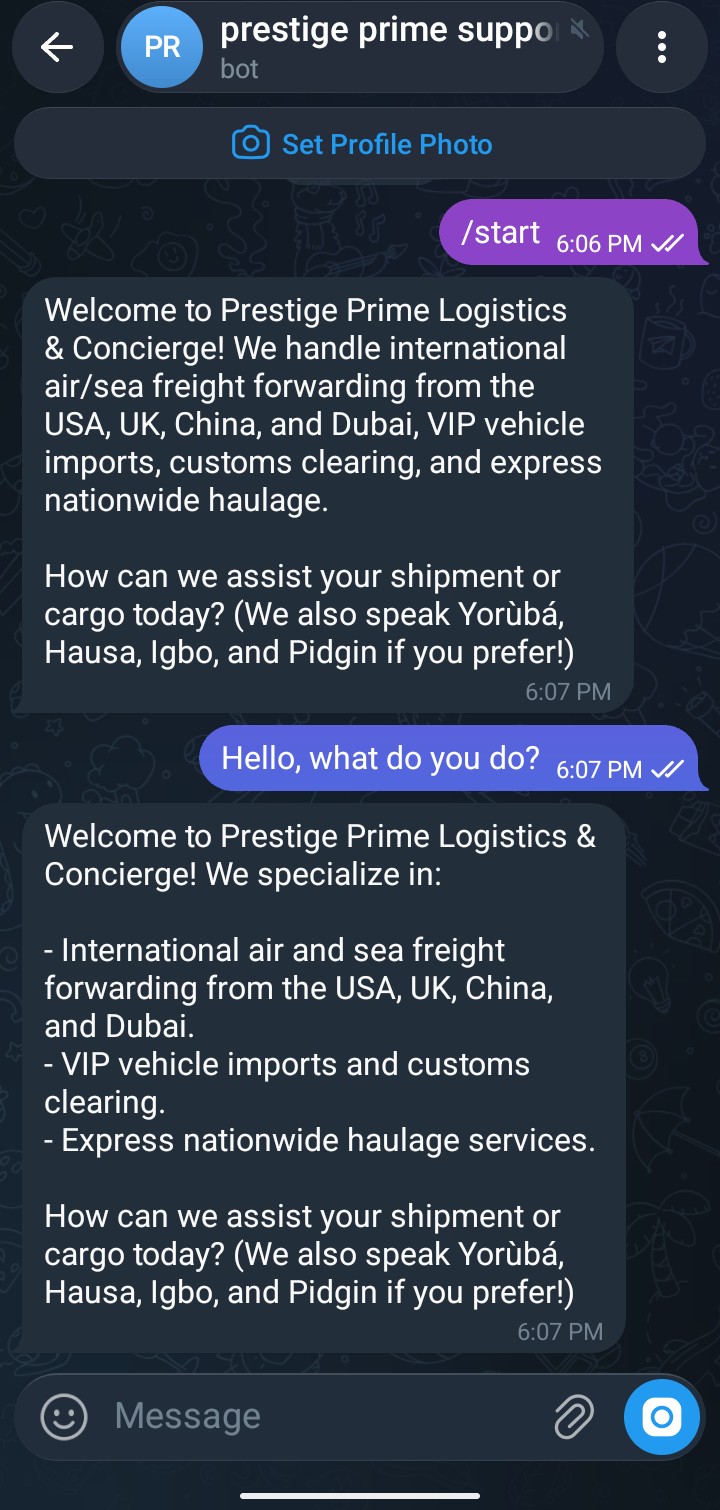
One of the biggest differentiators of this agent is its Universal Language Mirroring.
In business logistics across West Africa and global trade hubs, a buyer in Guangzhou might write in Mandarin, a supplier in Lagos might chat in Nigerian Pidgin or Yoruba, and an executive might message in formal English.
The agent’s system prompt strictly instructs it to mirror the customer’s exact dialect while automatically extracting their language preference:
MULTILINGUAL INTELLIGENCE (MANDATORY UNIVERSAL LANGUAGE MIRRORING):
- You MUST ALWAYS match and reply in the EXACT language the user speaks:
  * Nigerian Pidgin: Reply 100% in authentic Nigerian Pidgin ("How far! No wahala at all...", "We dey charge $4.50 to $7.50 per kg...").
  * Yoruba: Reply 100% in proper Yoruba ("Ẹ n lẹ o! Ẹ ku iṣẹ o...").
  * Hausa: Reply 100% in fluent Hausa ("Sannu da zuwa! Muna kula da...").
  * Igbo: Reply 100% in authentic Igbo ("Nnọọ! Anyị na-ebu...").
  * French, Arabic, Chinese, Spanish, German: Immediately detect and reply 100% fluently!
  * English: Reply in polished, professional English.
- Automatically trigger `set_preferred_language` to persist their language preference in the database.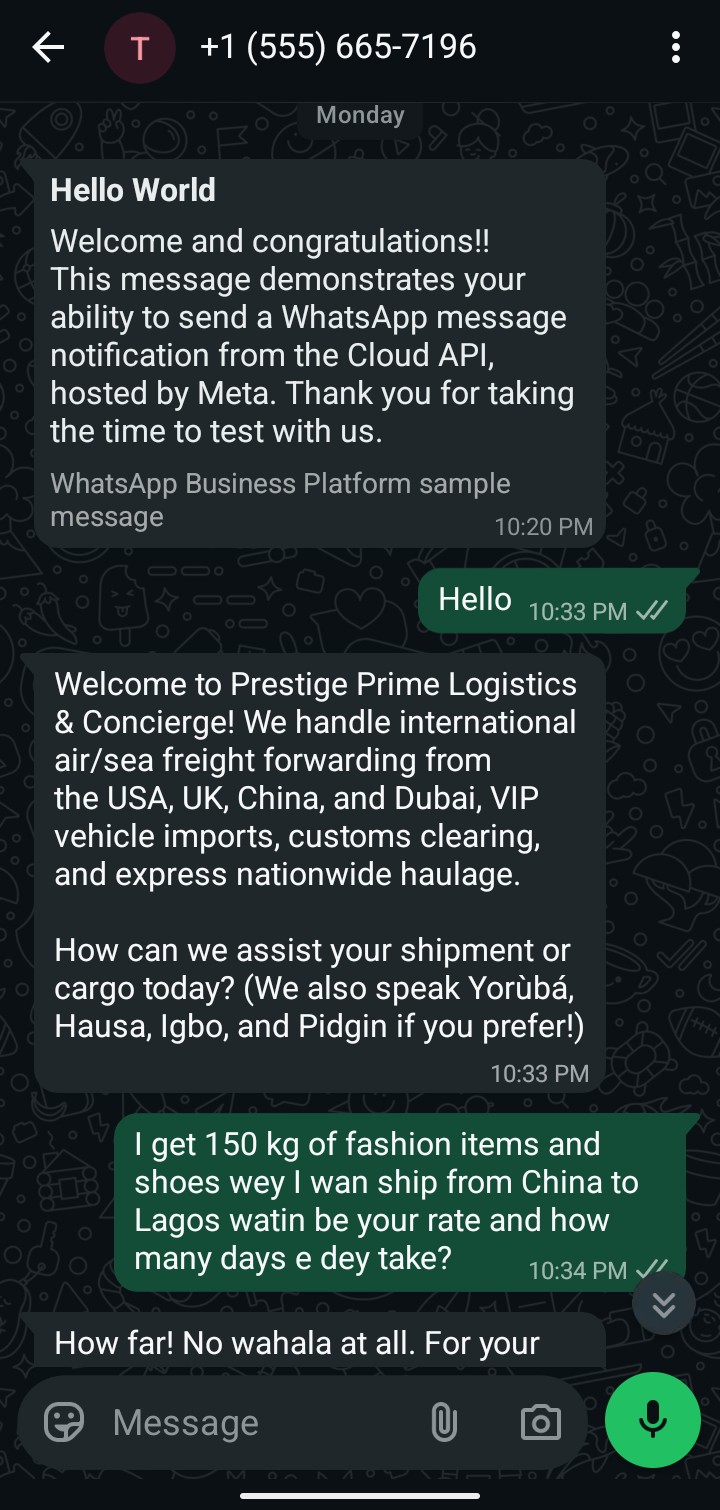
4. Live Control Hub: Real-Time Human Takeover & Audit
Fully autonomous agents are great, but mission-critical sales require human oversight. When a VIP client requests custom terms or an edge case arises, human agents need immediate visibility and the ability to take control.
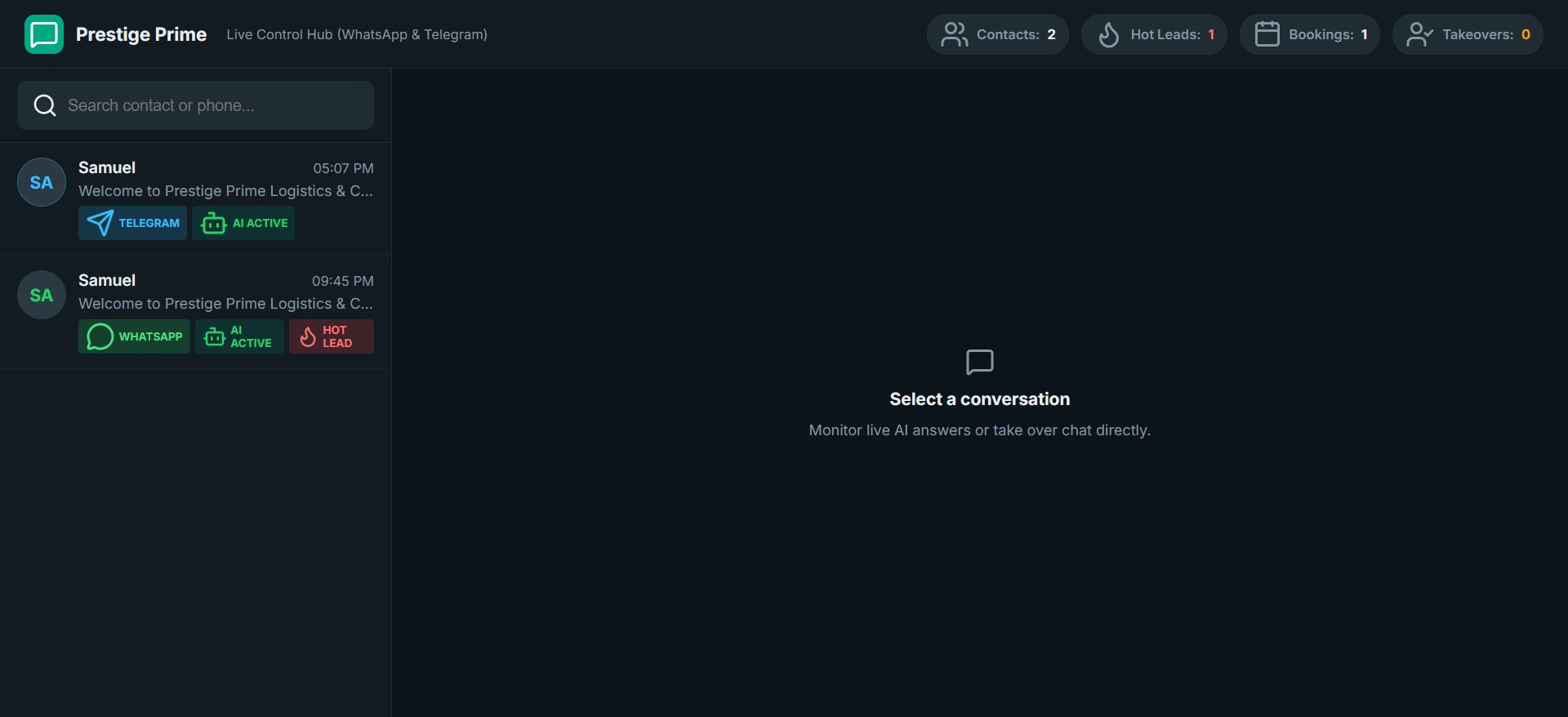
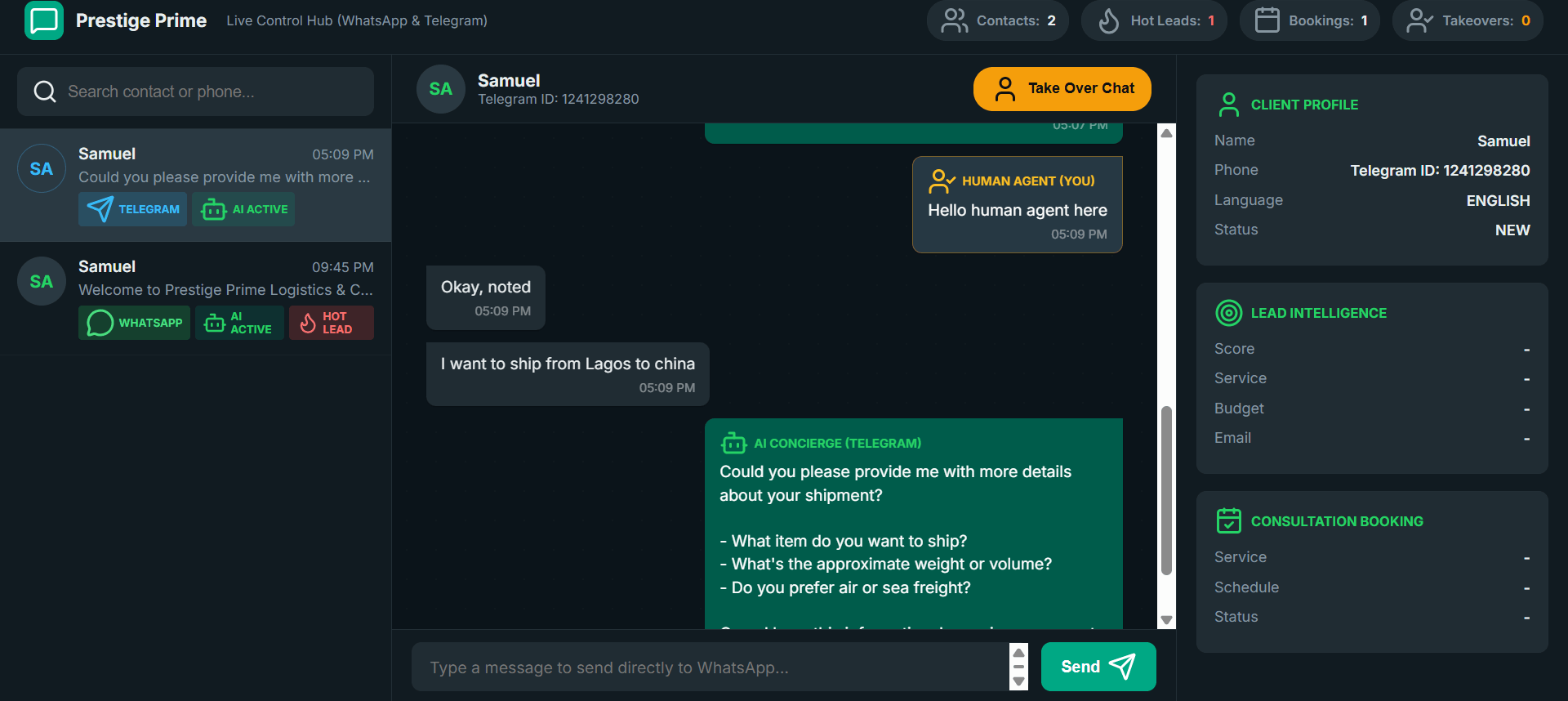
The system includes a single-page Admin Live Control Hub served directly by FastAPI:
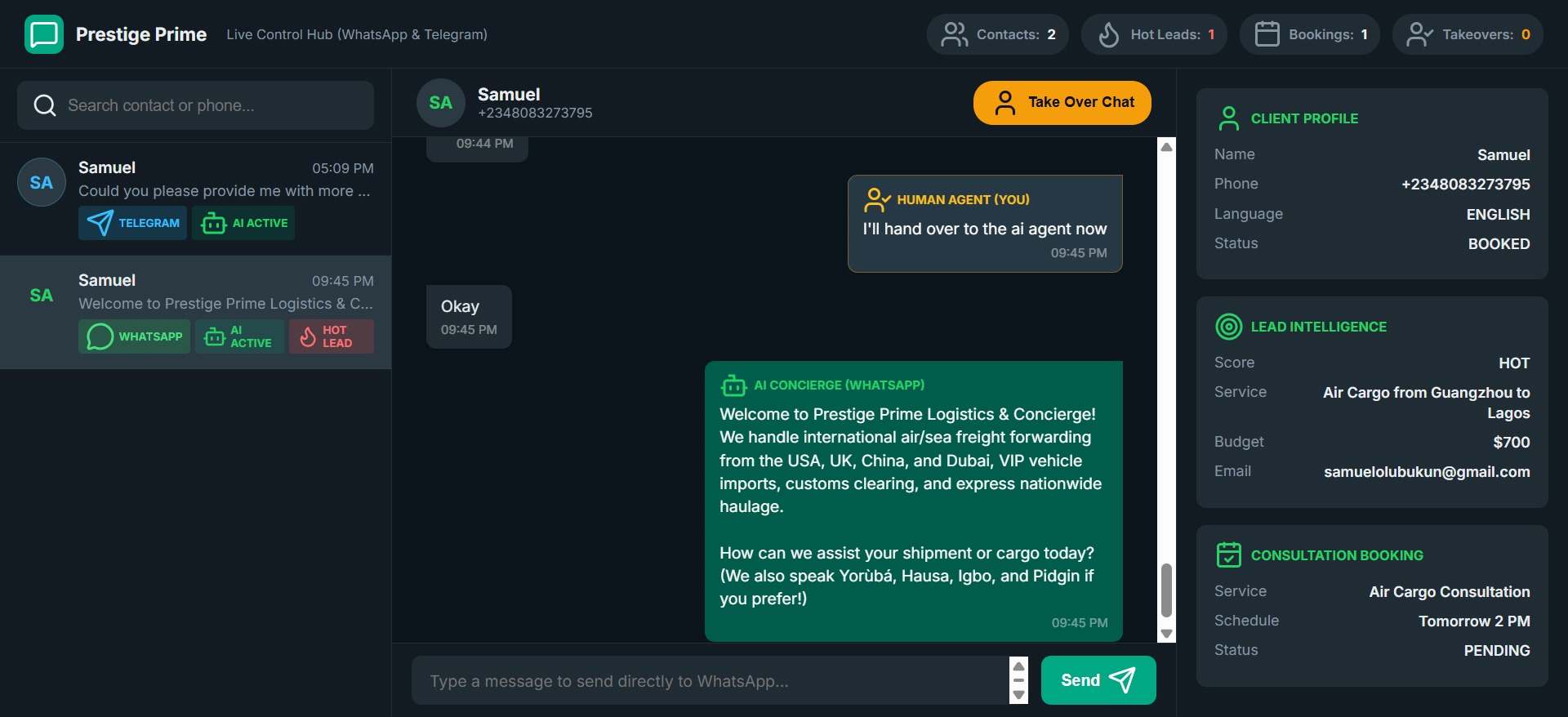
Key Capabilities of the Control Hub:
- Live Multi-Channel Feeds: Unified inbox showing active WhatsApp and Telegram threads side-by-side with real-time updates.
- Dynamic AI Toggle (Human Takeover): One-click pause to freeze automated AI replies on any individual chat session while a human representative steps in.
- Direct Outbound Messaging: Dispatch instant custom replies, quotes, or status updates directly to the customer’s phone or Telegram account.
- Conversion Telemetry: Real-time metrics tracking qualified leads, scheduled bookings, and message throughput.
5. Integrating with n8n & Workflow Automation
To make the agent a core part of an enterprise stack, we exposed secured outbound dispatch endpoints (/whatsapp/send and /telegram/send) protected with header authentication (x-api-key).
This allows n8n, Zapier, or background cron workers to trigger proactive transactional messages (such as shipping updates, order confirmations, and abandoned cart recovery):
curl -X POST "https://whatsapp-agent.yourdomain.com/whatsapp/send" \
     -H "Content-Type: application/json" \
     -H "x-api-key: YOUR_SECURE_INTERNAL_KEY" \
     -d '{
       "to": "15551234567",
       "text": "Hello! Your air cargo tracking number #NG-84920 has landed in Lagos and is clearing customs."
     }'
6. Key Takeaways & Production Best Practices
Deploying LLM agents over messaging networks taught us several critical lessons:
- Keep Mobile Messages Short and Formatting Clean: Long paragraphs or excessive markdown headers (
###) look awkward on mobile screens. Clean dashes, bullet lists, and single follow-up questions maximize response rates. - Isolate Database Writes in Tools: Never rely on raw LLM generation to formulate SQL statements. Always use strictly typed Pydantic models and parameterized SQLAlchemy queries inside function handlers.
- Use Cloudflare Tunnels for Local Development: Replacing ngrok with named Cloudflare Tunnels (
cloudflared tunnel run) provides persistent HTTPS domains and eliminates the headache of updating Meta webhook callback URLs on every reboot. - Permanent System User Tokens for Meta: Avoid using short-lived developer tokens from the Meta dashboard. Generate a permanent System User Token under Meta Business Settings with
whatsapp_business_messagingpermissions to prevent unexpected 401 unauthorized errors in production.
Get the Code
The complete source code (including the FastAPI backend, SQLAlchemy database schema, OpenAI function calling pipeline, and the Admin SPA) is open source on GitHub:
👉 FastAPI WhatsApp & Telegram AI Agent CRM Template on GitHub

Samuel Olubukun
Full Stack AI Engineer
I'm a Full Stack AI Engineer focused on applied AI, autonomous agents, and production-grade web applications.